Introduction
The SnapXam Math OCR API extracts and interprets mathematical expressions from images, returning the expression in LaTeX format and infix notation.
Base URL:
https://api.snapxam.com/v1
Authentication
All API calls must include your API key in the Authorization header:
Authorization: Bearer YOUR_API_KEY
/ocr/recognize
Extracts math content from an image and returns the expression in LaTeX format. You can specify the image to recognize like the example below.
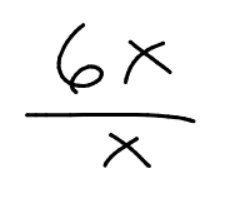
Request:
	POST https://api.snapxam.com/v1/ocr/recognize
	Content-Type: application/json
	Authorization: Bearer YOUR_API_KEY

	{
		"image_data": "data:image/png;base64,..."
	}
Response:
	{
		"latex": "\\frac{6x}{x}",
		"infix": "(6x)/x"
	}
/math/solve
Solves a math expression using SnapXam's Math Solver. The endpoint handles algebra, trigonometry, calculus and differential equations. Supports input in LaTeX, infix notation and image (base64) formats. Outputs the answer in LaTeX and infix notation (if available).
Request:
	POST https://api.snapxam.com/v1/math/solve
	Content-Type: application/json
	Authorization: Bearer YOUR_API_KEY

	{
		"latex": "\\int xdx",
		"infix": "int(x)dx",
		"image_data": "data:image/png;base64,..."
	}
Response:
	{
		"answer": "$\\frac{1}{2}x^2+C_0$",
    	"answer_infix": "1/2x^2+c_0"
	}
/math/simplify
Simplifies a math expression using SnapXam's Math Solver. The endpoint handles algebra, trigonometry, calculus and differential equations. Supports input in LaTeX, infix notation and image (base64) formats. Outputs the answer in LaTeX and infix notation (if available).
Use parameter: include_steps: true, to include the step-by-step followed to reach the answer.
Request:
	POST https://api.snapxam.com/v1/math/simplify
	Content-Type: application/json
	Authorization: Bearer YOUR_API_KEY

	{
		"latex": "\\frac{x^2+x-2}{x^2+5x+6}",
		"infix": "(x^2+x-2)/(x^2+5x+6)",
		"image_data": "data:image/png;base64,...",
		"include_steps": true
	}
Response:
	{
		"answer": "$\\frac{x-1}{x+3}$",
		"answer_infix": "(x-1)/(x+3)",
		"steps": [
			{
				"step": "Factor the trinomial $x^2+5x+6$ finding two numbers that multiply to form $6$ and added form $5$",
				"latex": "$\\begin{matrix}\\left(2\\right)\\left(3\\right)=6\\\\ \\left(2\\right)+\\left(3\\right)=5\\end{matrix}$"
			},
			{
				"step": "Rewrite the polynomial as the product of two binomials consisting of the sum of the variable and the found values",
				"latex": "$\\frac{x^2+x-2}{\\left(x+2\\right)\\left(x+3\\right)}$"
			},
			...
	}
/math/factor
Factors a math expression using SnapXam's Math Solver. The endpoint handles algebra, trigonometry, calculus and differential equations. Supports input in LaTeX, infix notation and image (base64) formats. Outputs the answer in LaTeX and infix notation (if available).
Request:
	POST https://api.snapxam.com/v1/math/factor
	Content-Type: application/json
	Authorization: Bearer YOUR_API_KEY

	{
		"latex": "x^2-5x+6",
		"infix": "x^2-5x+6",
		"image_data": "data:image/png;base64,..."
	}
Response:
	{
		"answer": "$\\left(x-2\\right)\\left(x-3\\right)$",
		"answer_infix": "(x-2)(x-3)"
	}